
How to set up a bonus gift card promotion
Reward guests who buy gift cards with a free bonus gift card, such as "Buy $100 in gift cards, get a $25 bonus card." Build the promotion in Cart Rules with spend tiers, limits, and a purchase schedule.
A bonus gift card promotion gives guests a free gift card when they buy gift cards from you. For example: “Buy $100 in gift cards, get a $25 bonus card.” Guests pay only for the gift cards they buy, and GoTab issues the bonus card for free. You choose the amounts; the ones in this article are only examples.
You build the promotion in Cart Rules. It works for gift cards bought on your e-commerce gift card page, through QR or online ordering, and on your POS.
Is this right for my location?
Section titled “Is this right for my location?”Bonus gift cards are a good fit if you sell gift cards and want to sell more of them at a busy time, such as the holidays, Mother’s Day, or Father’s Day. The bonus brings the guest back to spend it, often with a friend.
This feature is available at every location that has a gift card product set up. If you don’t see Gift Card Bonus as an option in Cart Rules, contact support using the support chat on your Manager Dashboard or in the GoTab Manager app.
Before you start
Section titled “Before you start”- Set up gift cards. You need a gift card program and a gift card product on your menu. See How to set up gift cards.
- Check your gift card program. Bonus promotions work with GoTab gift cards and Clutch gift cards. Intercard and STS gift cards aren’t supported, so they don’t appear when you choose a gift card for the promotion.
- Decide on your offer. Know how much a guest has to spend, how much the bonus card is worth, and whether you want to cap how many bonus cards one order can earn.
- One promotion per gift card program. Each gift card program can have only one active bonus promotion at a time. Once a program has one, its gift card no longer appears when you create another. To change the offer, edit the existing promotion.
How the tiers work
Section titled “How the tiers work”Each promotion has one or more tiers. A tier says how much a guest spends on gift cards and what bonus card they get for it.
- A guest gets one bonus card for every full amount of the highest tier they reach. With a “$100 → $25” tier, a $250 purchase earns two $25 bonus cards.
- With more than one tier, the guest earns from the highest tier they reach.
- If you turn on stacking, any money left over after the highest tier counts toward the lower tiers.
- Bonuses are counted per order. Gift cards bought on separate orders, or by the same guest on different days, don’t add up toward a tier.
Stacking example. Your tiers are “$100 → $10” and “$250 → $25.” A guest buys $350 in gift cards.
| Stacking | What the guest earns |
|---|---|
| Off | One $25 card. The $100 left over earns nothing. |
| On | One $25 card, plus one $10 card for the $100 left over. |
Create the promotion
Section titled “Create the promotion”-
In your Manager Dashboard, go to Cart Rules.
-
Select Add New Discount/Fee/Coupon.
-
Choose Gift Card Bonus, then choose the Gift Card Bonus template.
-
Name the rule. Guests don’t see this name. Use something your team will recognize, such as “Holiday 2026 bonus.”
-
Choose the gift card. Pick the gift card product that earns the bonus. Purchases of this gift card count toward the tiers, and the bonus card is issued on the same gift card program, so guests spend it like any other card. You can’t change the gift card after the rule is saved.
-
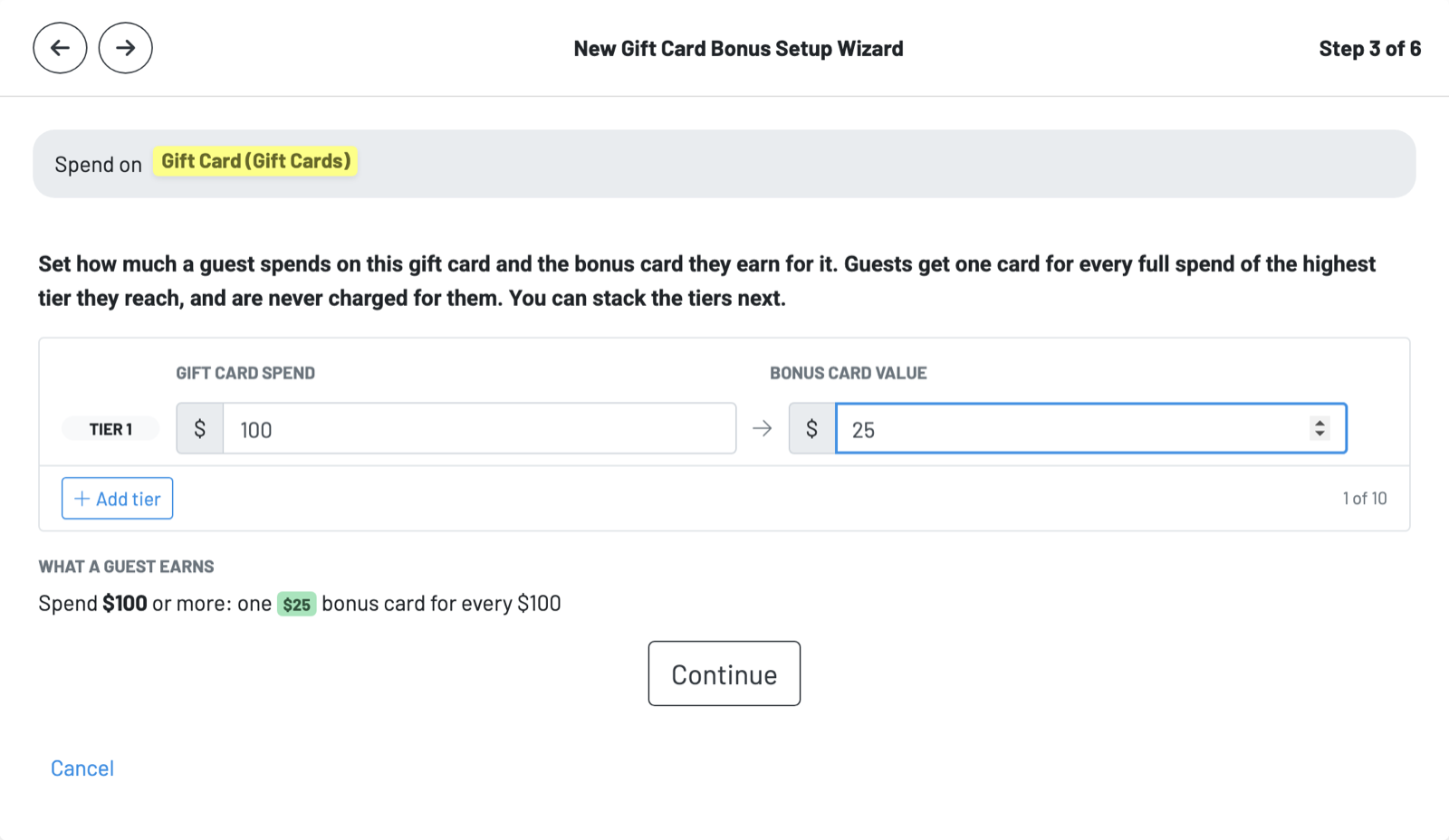
Set your tiers. For each tier, enter the Gift card spend and the Bonus card value. Select Add tier to add more. The What a guest earns preview shows the offer in plain language. Select Continue when it looks right.
-
Should the tiers stack? Choose Yes or No. This question only matters if you have more than one tier.
-
Is there a maximum number of bonus cards one order can earn? Choose Yes and pick a number, or choose No.
-
Is there a maximum bonus value one order can earn? Choose Yes and enter a dollar amount, or choose No. Bonus cards are never split to fit the cap, so the cap must be at least as large as your biggest bonus card.
-
Review the summary and select Create.
New promotions start off. Set the schedule (below), then turn the rule on from its row on the Cart Rules page. Guests can’t earn a bonus until the rule is on.
Limit when guests can buy (purchase dates)
Section titled “Limit when guests can buy (purchase dates)”To create urgency, limit the promotion to a set time frame, such as Black Friday through December 24. Schedule the rule the same way you schedule any other cart rule. Guests earn a bonus only on gift cards bought while the rule is on and inside its schedule.
The schedule controls when guests can earn a bonus. It doesn’t limit when the bonus card can be spent. On Clutch gift cards, you can also set the days bonus cards can be used (see the next section).
Set bonus card terms and dates (Clutch gift cards only)
Section titled “Set bonus card terms and dates (Clutch gift cards only)”If your promotion uses a Clutch gift card, you can set terms and redemption dates for its bonus cards. After you create the rule, select Messaging on the rule’s row in Cart Rules to open Bonus card terms.
- Bonus card terms: Enter up to 2,000 characters to show in the email that delivers each bonus card, for example “Bonus card issued with a gift card purchase. Not valid toward gift card purchases.” If you leave it empty, GoTab shows its standard text.
- Days bonus cards can be used: Enter a First day and Last day to limit when guests can spend their bonus cards, for example January 1 through March 31. The dates are set on each bonus card in Clutch when it’s issued and appear in the bonus card’s email and text. Leave both empty for bonus cards that can be used any time.
Select Save when you’re done.
Promotions on GoTab gift cards don’t have a Messaging option, so their bonus cards can’t be limited to certain dates.
What guests see
Section titled “What guests see”The bonus card shows up as its own line at no charge once the order includes enough gift cards to earn it. Who receives the bonus card depends on where the guest buys.
| Where the guest buys | How they choose who gets the bonus | If nobody chooses, the bonus goes to |
|---|---|---|
| E-commerce gift card page | The page asks Who gets your bonus gift card? | The buyer (Me is selected by default) |
| QR or online checkout | A Choose who gets your bonus gift card link under the bonus line | The recipient of the gift card that earned it |
| POS with a customer display | The guest chooses on the customer display when the order is sent | The recipient of the most recent gift card on that program in the order |
| POS without a customer display | Staff enter the recipient on the POS when the order is sent | The recipient of the most recent gift card on that program in the order |
Buying on the e-commerce gift card page
Section titled “Buying on the e-commerce gift card page”On your gift card page, a banner shows the offer, for example “Get a $25 bonus gift card for every $100 in gift cards you buy.” Once the cart earns a bonus, the guest chooses Who gets your bonus gift card?:
- Me: The bonus card goes to the person buying. This is selected by default.
- The person I’m sending the gift card to: The bonus card goes to the gift card recipient. If the guest is sending gift cards to more than one person, they choose which one at checkout.
Buying through QR or online checkout
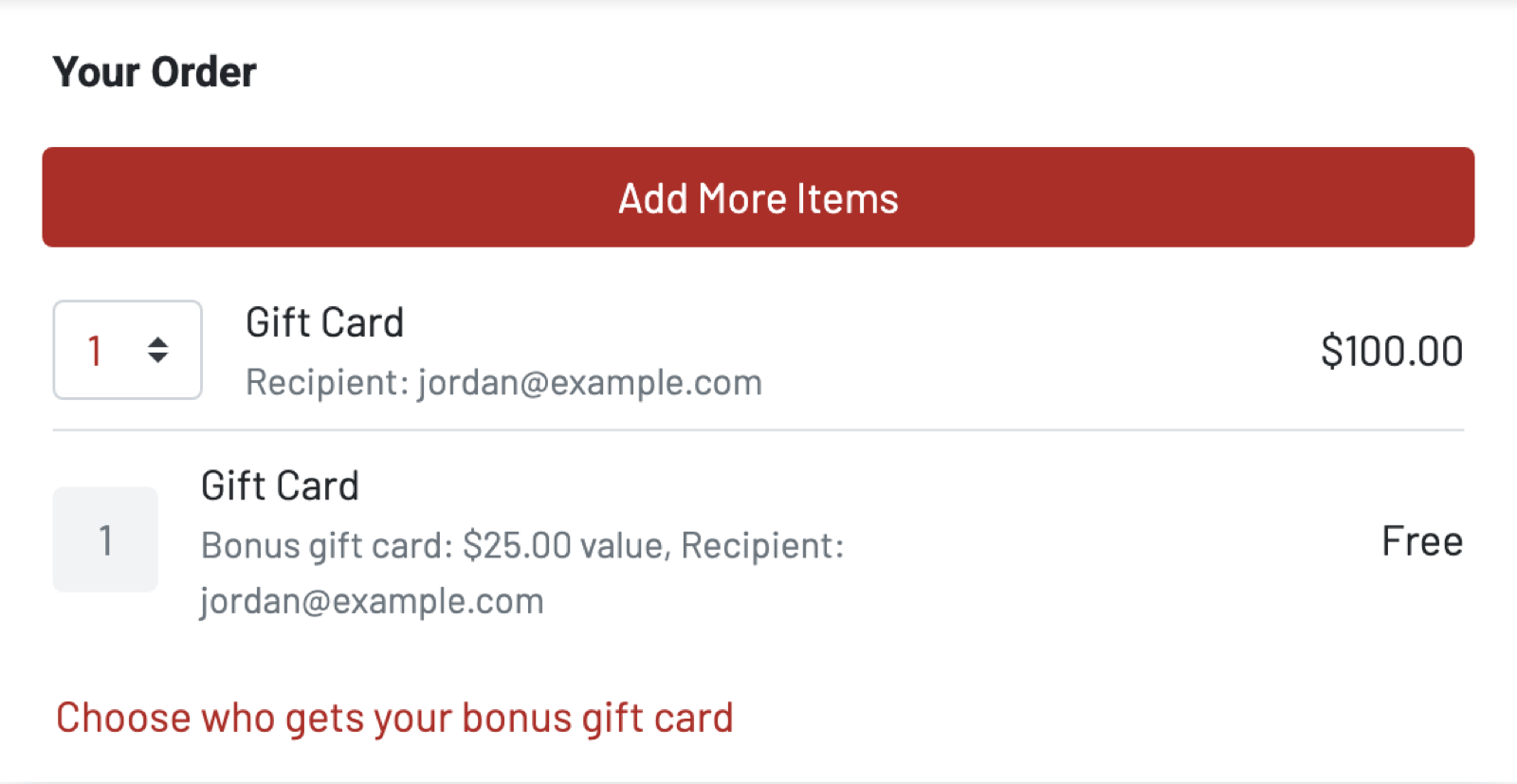
Section titled “Buying through QR or online checkout”At checkout, the bonus card appears as a separate Free line under the gift card. The guest can select Choose who gets your bonus gift card to send it to someone else.
Buying on the POS
Section titled “Buying on the POS”When a tab earns a bonus card, the POS shows You earned a bonus gift card with the total bonus value when the order is sent. If a customer display is connected, the guest fills this in on the display. Staff can select Finish Here Instead to complete it on the POS.
Enter where to send each card:
- Choose Text or Email and enter the guest’s mobile number or email. Some Clutch gift card programs send by email only, so only an email address works.
- If the order earns more than one bonus card, choose One card to combine them for one person, or Separate cards to send each one to a different person. Use the first for all copies the first recipient to every card.
- Select Send to confirm, or Skip to use the default recipient from the table above.
If a bonus card has no one to go to, for example because no gift card in the order has a recipient, the POS won’t send the order until you enter one.
Good to know
Section titled “Good to know”- Bonus cards are free. The guest is never charged for a bonus card.
- Bonus cards are always digital. The bonus card is sent by text or email, even when the guest bought a physical gift card.
- Guests may get two emails. A person who receives both a gift card and a bonus card gets a separate email for each. The bonus email’s subject reads “You’ve received a Bonus Gift Card to” followed by your location name.
- Combined or separate cards. On GoTab gift cards, when the guest skips choosing, bonus cards going to the same person are combined into one card. Clutch issues every bonus as its own card.
- Only new money earns a bonus. If a guest pays for gift cards with another gift card, that amount doesn’t count toward the bonus. This stops a guest from turning one gift card into endless bonus cards.
- Refunds take back bonus cards. If you refund gift cards and the order no longer reaches a tier, the bonus cards it no longer earns are taken back.
- Paying with a gift card on the POS can change the bonus. If a guest pays part of the tab with a gift card, the bonus is recalculated on what they paid with new money. The POS warns you when a bonus card changes value.
- Editing a live promotion. You can change the name, tiers, stacking, and limits. To use a different gift card, turn off the old rule and create a new one.
- Reporting. See Gift card reporting for gift card balances and activity.
Troubleshooting
Section titled “Troubleshooting”| What you see | Likely cause | What to do |
|---|---|---|
| Gift Card Bonus isn’t an option in Cart Rules | Your location has no gift card product, or the page needs a refresh | Make sure a gift card product exists, then refresh the Manager Dashboard. If it’s still missing, contact support. |
| Your gift card isn’t in the list when you create the rule | That gift card program already has an active bonus promotion, or it’s an Intercard or STS program | Edit the existing promotion instead. Intercard and STS gift cards aren’t supported. |
| A guest bought gift cards but got no bonus | The rule is off or outside its schedule, the order didn’t reach the first tier, or the order was paid with another gift card | Check the rule’s status, schedule, and tiers, then how the order was paid. Only new money earns a bonus. |
| The bonus is smaller than expected | Part of the tab was paid with a gift card, or a per-order cap applied | This is expected. The POS warns staff when a bonus card changes value. |
| A bonus card disappeared after a refund | The refunded order no longer reaches a tier | This is expected. Bonus cards the order no longer earns are taken back. |
| The bonus went to the wrong person | Nobody chose a recipient, so it went to the default for that channel | See the table in What guests see. Resend or reissue it the way you would any gift card. |
| The POS says “The guest’s bonus gift card choice could not be saved, so the order wasn’t sent” | The guest’s choice didn’t save | Send the order again. The guest is asked again. If it keeps happening, contact support. |
| The POS says “You opened another tab while the guest chose their bonus gift cards” | Staff switched tabs while the guest was choosing | Go back to the original tab and send the order again. |
| A Clutch promotion stopped issuing bonus cards while the rule is still on | The Last day in the rule’s Bonus card terms has passed | Move the Last day later, or clear it. |
| You want two offers on one gift card | Each gift card program can have one active promotion | Put both offers in one promotion as tiers, with stacking on or off. |
Can I run a bonus promotion on physical gift cards?
Yes. Gift cards sold on the POS earn the bonus whether they’re physical or digital. The bonus card itself is always sent by text or email.
Can I run two promotions at once?
Yes, on different gift card programs. Each gift card program can have one active bonus promotion at a time. To offer more than one level on the same gift card, add them as tiers in one promotion.
Can I limit when a bonus card can be spent?
Only on Clutch gift cards, using First day and Last day in the rule’s Bonus card terms. On GoTab gift cards, you can schedule when guests earn a bonus, but the bonus card can be spent like any other gift card.
Does the bonus count toward the guest’s next bonus?
No. Bonus cards are free and don’t count as gift card spend.