
Connect your GoTab account with Klaviyo
Learn how to connect your GoTab account/s with Klaviyo for streaming in real-time customer events.
Learn how to connect your GoTab account/s with Klaviyo for streaming in real-time customer events.
Section titled “Learn how to connect your GoTab account/s with Klaviyo for streaming in real-time customer events.”Summary
Section titled “Summary”GoTab and Klaviyo offer an integrated solution for operators to send real-time events related to guest behaviors. With GoTab connected to Klaviyo operators will be able to build customer lists and segments based on user behavior to strengthen guest relations, increase revenue streams and build greater guest engagement.
Step One
Section titled “Step One”Create a Klaviyo Account
If you do not already have a Klaviyo account or want to use a separate account for your GoTab customers, please navigate here to complete the registration. Once your account is created you will need to log-in to complete Steps Two and Three.
Create a Klaviyo Account
Step Two
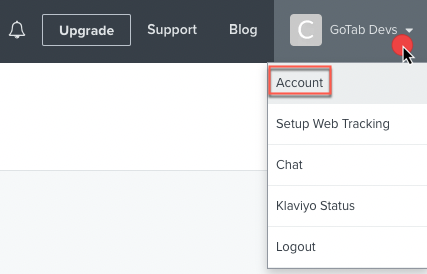
Section titled “Step Two”- After you sign in to Klaviyo (Owner, Admin or Manager user permissions required) click your account name in the top right drop down and select Account.
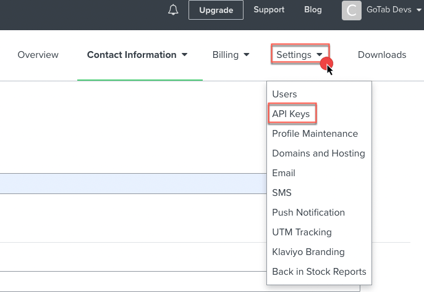
- From the Settings dropdown, select API Keys
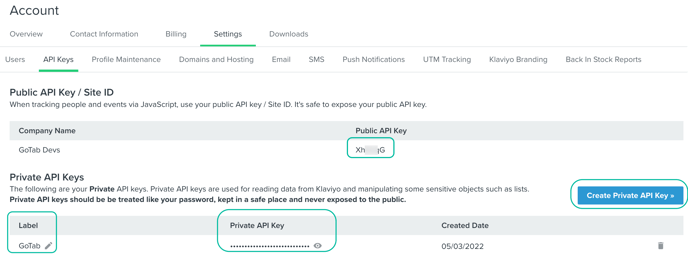
- Copy your public and private API Key
Step Three
Section titled “Step Three”Once you have created and copied your API Keys, GoTab will need this to connect your account/s with Klaviyo. Manager permissions are required for the user to complete this step. Below are the options to configure multiple accounts.
- If you have multiple GoTab accounts and what to use the same keys for a single Klaviyo account repeat step three for each GoTab account.
- If you have a set of keys from multiple Klaviyo accounts, enter each set with the corresponding GoTab account.
Complete the GoTab Integration page to connect your account/s
Public keys cannot be used to access secure data in your account and are safe to share. Public keys are used when you need to track people and events. Private keys are stored securely in GoTab and not shared externally. Private keys are used for guest subscriber events in GoTab and synced with Klaviyo for marketing communications.
By default, Klaviyo will create a list called Newsletter, this list can be used but it is recommended a new list be created in Klaviyo call GoTab Subscribers. View this article to learn more about creating lists.
Next Help Article for Klaviyo
Section titled “Next Help Article for Klaviyo”- How to create lists in Klaviyo