KDS: Ticket timer
KDS Ticket Timer In the KDS, there are two ways to account for time. Operators can choose to use the countdown mode or count up mode [simple ticket timer]. The
KDS Ticket Timer
In the KDS, there are two ways to account for time. Operators can choose to use the countdown mode or count up mode [simple ticket timer]. The countdown method shows the kitchen staff how much time it will take to prepare an item and orders. Whether using the countdown mode or count-up mode the ticket colors hold the same meaning.
Ticket Color
- The ticket timer and prep time prep intervals are set on each device.
- Gray - The order has just been placed.
- Yellow - The order has been sitting in the queue and has almost reached the allotted prep time.
- Red - The order is overdue.
- Green - A completed and dispatched order.
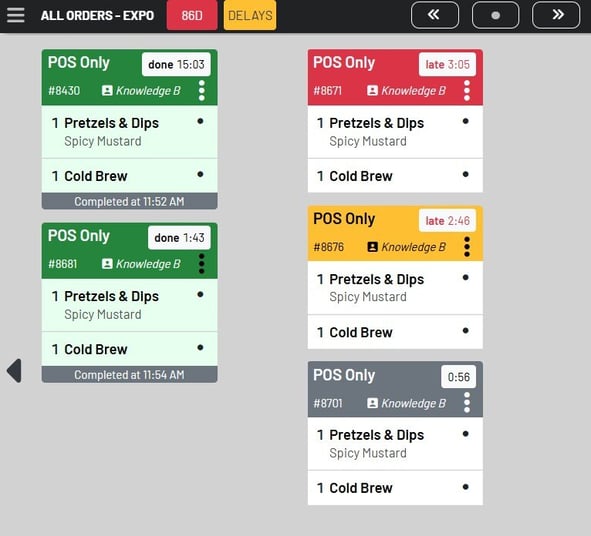 We also updated the yellow ticket timer to increase the contrast, making it easier to read.
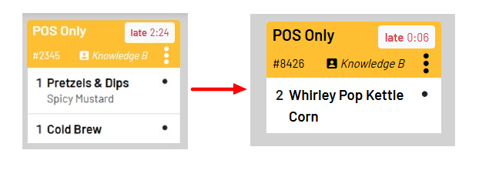 Countdown Mode
All incoming tickets will start at 0 and count up. There are no pre-set prep times associated with the items.
Ticket Timer Set-Up
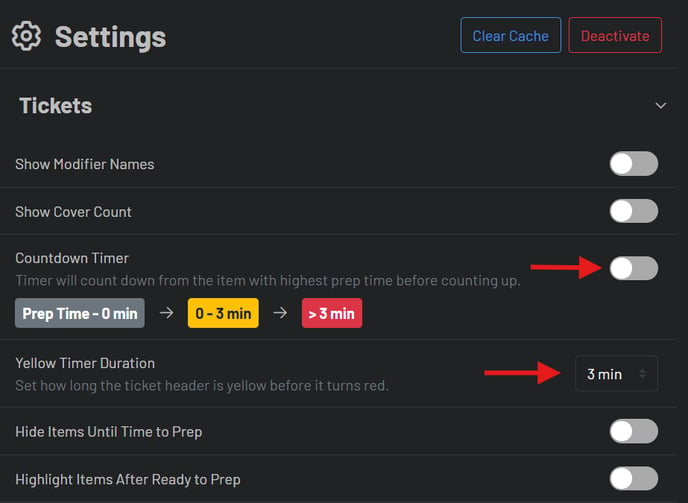
- Click the three bar icon in the left-hand corner
- Click Settings, then Tickets
- Choose to set the KDS to use the count-up or countdown mode
- Set the Timer Duration