
Station Overrides
In GoTab, you can set up station overrides that reroute products for fulfillment based on the zone the product is ordered in.
In GoTab, you can set up station overrides that reroute products for fulfillment based on the zone the product is ordered in.
Section titled “In GoTab, you can set up station overrides that reroute products for fulfillment based on the zone the product is ordered in.”Station overrides are often used on complex setups such as operations with multiple bars, prep stations, and kitchens. Station Overrides allow your large operation to accommodate different zones, products, and stations.
To understand how a Station Override is set up, a product that is tagged with Tag and ordered throughZone will be directed toStation.
In the example below, we see our Stone IPA is set to go to our Server Printer station as a baseline.
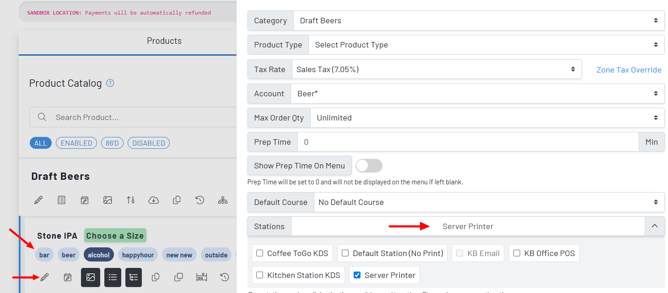
- Create a tag, and tag all applicable products in your product catalog. It’s important to do this first. In the above example, we’re going to use our “bar” tag to route our Stone IPA to somewhere other than the Server Printer in some instances.
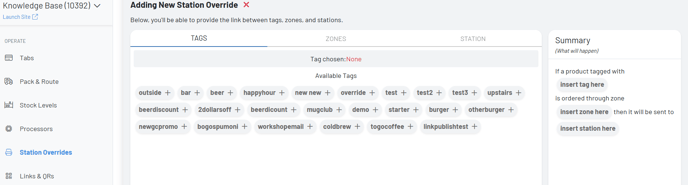
- Navigate to the Station Overrides tab in the Manager Dashboard
- Press Add
- Choose the tag
- Select the zone that needs rerouting to a new station
- Choose your station
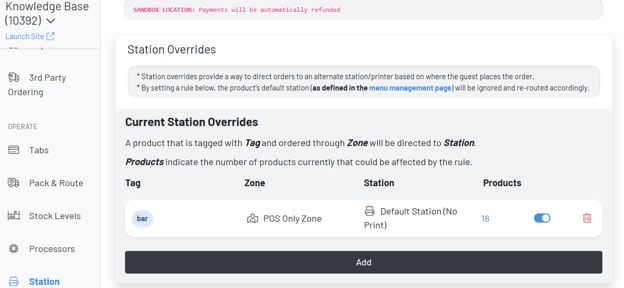 Final Product:
We now see that any item tagged with the “bar” tag—ordered in POS Only Zone—Routes to our Default No Print Station.