
How to set a minimum spend on a tab
Guarantee a tab reaches a negotiated dollar amount for private events, buyouts, and reservations. GoTab adds a Minimum Spend line for any shortfall and shrinks it as the guest orders.
Minimum Spend lets you guarantee that a tab reaches a dollar amount you’ve agreed on with the guest. If the guest orders less than the minimum, GoTab adds a Minimum Spend line item to the tab for the difference. As the guest orders, that line shrinks automatically — and once their orders reach the minimum, it disappears.
You set it tab by tab, from the Tab Details panel on any GoTab POS.
Is this right for my location?
Section titled “Is this right for my location?”Minimum Spend is built for any tab where you’ve quoted a spend commitment up front, such as:
- Private parties, banquets, and room or space rentals
- Buyouts and reserved sections
- Bottle-service or VIP tables
- Smaller reservations that carry a minimum
- Rooms or areas where entry requires a set spend, like a ticket price
It’s also a cleaner alternative to selling the guest a gift card for the minimum on the day of the event. A gift card adds to your gift card liability, and any unused balance can be shared or brought back another day. A minimum spend lives on the one tab and closes out with it.
If your location doesn’t run events or negotiated minimums, you don’t need this feature.
How the math works
Section titled “How the math works”The minimum is a pre-tax floor on the tab subtotal, never a cap. Using a $500 minimum:
| Guest has ordered | Food & drink | Minimum Spend line | Tab subtotal |
|---|---|---|---|
| Nothing yet | $0.00 | $500.00 | $500.00 |
| A few shared plates | $140.00 | $360.00 | $500.00 |
| A full dinner | $465.00 | $35.00 | $500.00 |
| More than the minimum | $620.00 | — | $620.00 |
Everything that affects the subtotal counts, including discounts. If a cart rule or happy hour discount lowers what the guest has spent, the Minimum Spend line grows by the same amount to keep the tab at the minimum.
Set a minimum on a tab
Section titled “Set a minimum on a tab”You can set a minimum at any point while the tab is open, whether you opened it with + Tab or Quick Order, and whether or not it’s assigned to a spot.
-
Open the tab, then open Tab Details. On the order screen, tap the guest icon at the top of the tab header.
-
Scroll to Minimum Spend. It sits at the bottom of Tab Details, below Segments.
-
Enter the amount and tap Set Minimum. Enter the minimum in dollars and cents, then tap Set Minimum. Once it saves, the button changes to Update Minimum and a Remove button appears.
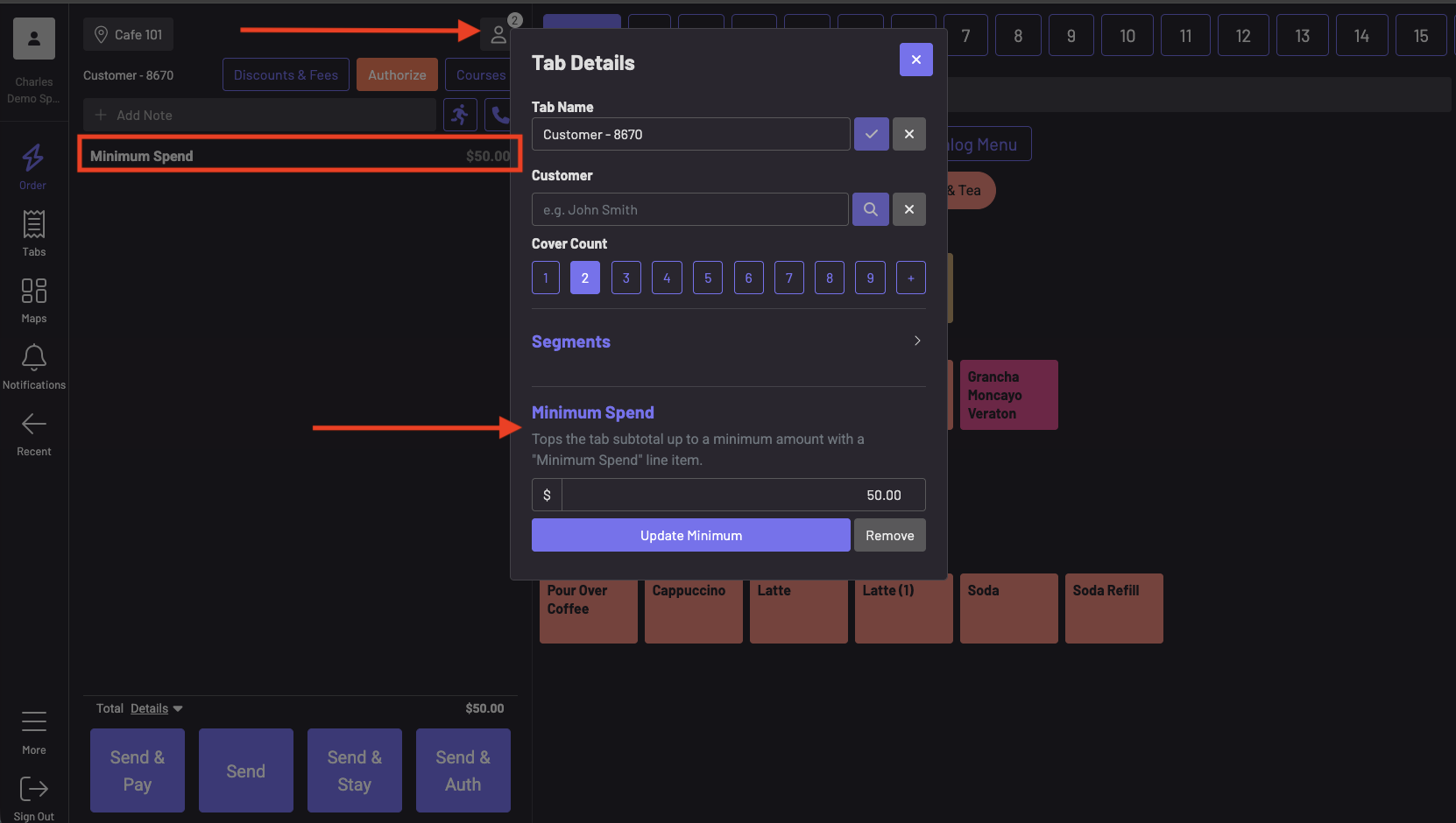
A Minimum Spend line now appears on the tab right away. If nothing has been ordered yet, it’s for the full minimum. In the example above, the $50.00 minimum brings the tab total to $50.00. You don’t need to send any items first. A tab with only a Minimum Spend line can be paid and closed like any other tab, which is useful when a guest pays the minimum up front or doesn’t order.
What happens as the guest orders
Section titled “What happens as the guest orders”Each time an order is sent, GoTab recalculates the Minimum Spend line against the tab subtotal. The subtotal stays at the minimum, but more of it now comes from real food and drink.
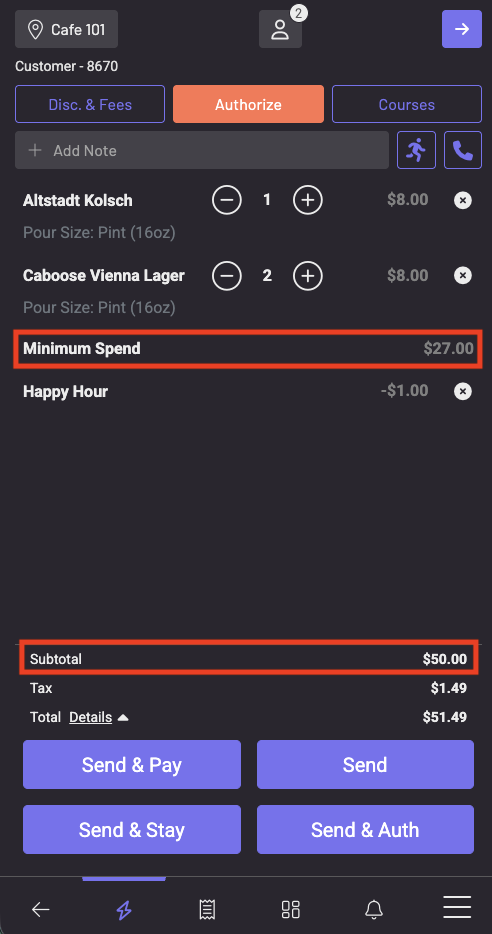
In this example, the guest has ordered $24.00 of beer and received a $1.00 Happy Hour discount, so $23.00 counts toward the $50.00 minimum. The Minimum Spend line has adjusted to $27.00 and the subtotal holds at $50.00. Tax ($1.49) is charged only on the beers, not on the Minimum Spend line.
The total can look high while an order is still in the cart. Until you tap Send, the POS shows the unsent items on top of the existing Minimum Spend line. The total settles to the correct amount as soon as the order is sent, so don’t change the minimum to chase that number.
Change or remove a minimum
Section titled “Change or remove a minimum”Both happen in the same Minimum Spend section in Tab Details, and the tab updates right away.
- To change it, enter a new amount and tap Update Minimum. If you raise it, the Minimum Spend line grows to cover the new difference. If you lower it below what the guest has already spent, the line comes off the tab.
- To remove it, tap Remove, or set the amount to $0.00. The Minimum Spend line comes off and the guest pays only for what they ordered.
If you decide to waive a minimum the guest didn’t meet, remove it rather than comping the Minimum Spend line. That keeps your sales and comp reporting clean.
After a tab is closed
Section titled “After a tab is closed”The Minimum Spend section only appears on open tabs. To change the minimum on a tab that’s already been paid, reopen it by removing the payment (this requires a manager PIN), update the minimum, and then apply payment again. See Remove payment and reopen tab. This only works on the same fiscal day. Once the day rolls over, the tab’s minimum is locked.
Keep in mind
Section titled “Keep in mind”- The Minimum Spend line isn’t taxed. It’s charged at 0%, and tax is calculated only on the items the guest ordered. Whether an unmet minimum should be taxed in your state is a question for your accountant. It can’t be changed from a setting today, so contact your GoTab account manager if yours says it should be taxed.
- It doesn’t block ordering. Minimum Spend adds a charge. It doesn’t stop or warn anyone when a tab is under its minimum.
- No gratuity, tip, or discount applies to the Minimum Spend line itself. Auto-gratuity, service charges, and tip suggestions are calculated on the real items only. On a $500-minimum tab with $140 of food, tip suggestions are based on $140, so let your servers know ahead of time.
- It’s set per tab, not per location or zone. Every tab carries its own minimum, and you can set a different amount on each one.
- Any POS user who can open Tab Details can set, change, or remove a minimum. No manager PIN is required. If that’s a concern, set a house rule for who manages minimums.
- Voiding an item raises the Minimum Spend line back up. Voided items no longer count toward the minimum.
- Cash rounding doesn’t count toward the minimum. If you use cash rounding, those pennies are left out so they can’t wear down the minimum.
- The guest sees it on their tab and receipt as a line named “Minimum Spend,” with no other explanation. Tell guests about the minimum when you quote it and again when you present the check.
A good house rule: whoever books the event sets the minimum on the tab when it’s opened, notes the amount on the reservation, and tells the server.
Where to find it in reporting
Section titled “Where to find it in reporting”Minimum Spend is recorded as a product, not a fee, and it counts toward net sales.
- Product Mix: Go to Manager Dashboard > Product Mix and look for the Minimum Spend product. It shows each Minimum Spend line that was paid out, and its amount. See Reports: Product Mix.
- Sales: On the Sales page, Minimum Spend is included in your open items account under Net Sales. It doesn’t appear under Fees.
Does Minimum Spend stop guests from ordering? No. It only adds a charge for any shortfall.
Is the Minimum Spend line taxed? No. It’s charged at 0%. Tax applies only to the taxable items the guest ordered.
Do discounts count toward the minimum? Discounts lower what the guest has spent, so the Minimum Spend line grows to make up the difference. Discounts and cart rules never apply to the Minimum Spend line itself.
Do auto-gratuity or tip suggestions include the Minimum Spend line? No. Both are calculated on the real items only.
Can I close out a tab that only has a Minimum Spend line? Yes. You don’t need to ring in any items. Set the minimum, then pay and close the tab as usual.
Can I set a minimum for a whole location or zone? No. Minimums are set tab by tab.
Can I set or change a minimum on a closed tab? Not directly. Reopen the tab by removing the payment with a manager PIN, update the minimum, and apply payment again. This only works on the same fiscal day.
How is this different from a spend limit? A minimum spend is a floor the guest pays at least. A tab spend limit notifies the server when a tab reaches a set amount, and a pass spend limit caps what a guest can spend on an RFID or phone pass.
How is this different from an event deposit? An event deposit is money collected before the event and applied to the tab as payment. A minimum spend guarantees how much the tab totals. You can use both on the same event.