
OAuth Flows
Choose and implement the right OAuth flow for your GoTab integration.
GoTab supports two OAuth 2.0 grant types. Which one you use depends on whether your integration acts on behalf of itself (server-to-server) or on behalf of a specific GoTab user.
| Flow | Best for |
|---|---|
| Client Credentials | Server-to-server integrations, background jobs, data imports |
| Authorization Code | Marketplace apps, multi-tenant SaaS, acting as a specific manager |
For the quick path to a token (most integrations start here), see Authentication.
Client Credentials Flow
Section titled “Client Credentials Flow”The client credentials grant is the simplest flow GoTab supports. Your server exchanges its api_access_id and api_access_secret directly for a Bearer token — no user interaction required.
Request an access token
Section titled “Request an access token”curl --request POST \ --url https://gotab.io/api/oauth/token \ --header 'Accept: application/json' \ --header 'Content-Type: application/json' \ --data '{ "api_access_id": "YOUR_API_ACCESS_ID", "api_access_secret": "YOUR_API_ACCESS_SECRET" }'Response:
{ "tokenType": "Bearer", "token": "eyJ...", "initiated": 1659020513, "expires": 1659106913, "expiresIn": 86400, "refreshToken": "..."}Grant location access
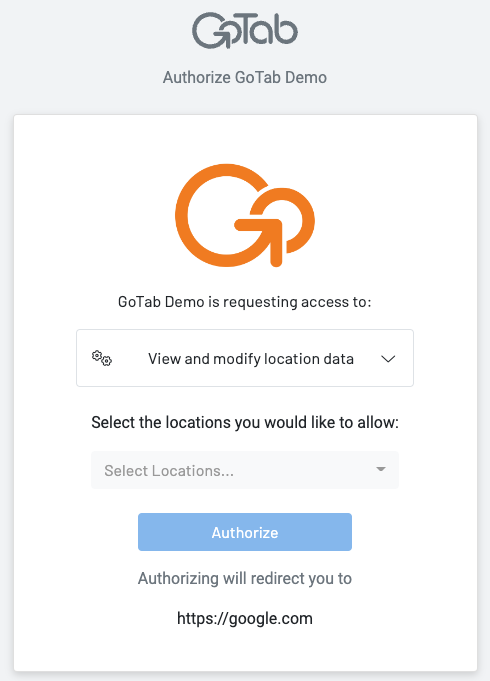
Section titled “Grant location access”Before your integration can read or write location data, an authorized GoTab user must grant it access. Send users to the authorization portal:
https://gotab.io/manager/oauth?access_id=YOUR_ACCESS_ID&redirect_url=YOUR_REDIRECT_URLOptional query parameters:
| Parameter | Description |
|---|---|
loc_limit | Max locations a user can authorize at once. Omit for no limit. Must be > 0. |
response_type | Set to token or omit entirely for client credentials. |
After the user clicks Authorize, GoTab redirects to your redirect_url with:
?locationUuids=uuid1,uuid2,uuid3Your integration now has access to those locations. List locations will return the full set of authorized locations.
Authorization Code Grant Flow
Section titled “Authorization Code Grant Flow”Use this flow when your integration needs to act on behalf of a specific GoTab user — for example, showing a manager only the locations they personally have access to.
Step 1 — Direct the user to the authorization endpoint
Section titled “Step 1 — Direct the user to the authorization endpoint”Place a button or link in your app that sends the user to:
https://gotab.io/manager/oauth?response_type=code&access_id=YOUR_ACCESS_ID&redirect_url=YOUR_REDIRECT_URL&state=RANDOM_UUIDRequired parameters:
| Parameter | Value |
|---|---|
response_type | Must be code |
access_id | Your api_access_id |
redirect_url | Must exactly match a URL configured in the Integration Dashboard |
state | Optional but recommended — a random value (e.g. UUID) to prevent CSRF |
Step 2 — Handle the redirect
Section titled “Step 2 — Handle the redirect”After the user authorizes, GoTab redirects to your redirect_url with:
?code=AUTH_CODE&state=YOUR_STATE_VALUEVerify the state matches what you sent. The code is single-use and short-lived.
Step 3 — Exchange the code for a token
Section titled “Step 3 — Exchange the code for a token”curl --request POST \ --url https://gotab.io/api/oauth/token \ --header 'Accept: application/json' \ --header 'Content-Type: application/json' \ --data '{ "grant_type": "authorization_code", "api_access_id": "YOUR_API_ACCESS_ID", "api_access_secret": "YOUR_API_ACCESS_SECRET", "code": "CODE_FROM_REDIRECT" }'Response:
{ "tokenType": "Bearer", "token": "eyJ...", "initiated": 1659020513, "expires": 1659106913, "expiresIn": 86400, "refreshToken": "..."}Step 4 — Make requests
Section titled “Step 4 — Make requests”Pass the token as Authorization: Bearer YOUR_TOKEN on every request. Requests are scoped to that user: List locations, for example, returns only the locations that user can access — not all locations the integration has access to.
Building Your OAuth Implementation
Section titled “Building Your OAuth Implementation”Both flows land users on the same GoTab authorization portal. Here’s what the authorization screen looks like:
Token storage
Section titled “Token storage”- Store tokens server-side, never in the browser.
- Keep
api_access_idandapi_access_secretin environment variables or a secrets manager. - Associate tokens with the location UUIDs or user IDs they were issued for.
Token refresh
Section titled “Token refresh”Tokens expire after 24 hours (expiresIn: 86400). Schedule a refresh before expiry to avoid mid-session failures:
curl --request POST \ --url https://gotab.io/api/oauth/token \ --header 'Content-Type: application/json' \ --data '{ "grant_type": "refresh_token", "api_access_id": "YOUR_API_ACCESS_ID", "api_access_secret": "YOUR_API_ACCESS_SECRET", "refresh_token": "YOUR_REFRESH_TOKEN" }'The refresh token itself does not expire, but it is invalidated if the access is revoked.
Error handling
Section titled “Error handling”| Error | Meaning | Action |
|---|---|---|
401 Unauthorized | Token expired or revoked | Refresh the token and retry |
403 Forbidden | Token invalid (bad format, wrong credentials) | Do not retry — re-authenticate |
Handle 401 responses gracefully in your HTTP client by automatically refreshing and retrying once before surfacing an error to the user.
See also
Section titled “See also”- Authentication — Quick start: get a token in 2 minutes
- Create API Credentials — Set up your sandbox and Integration Dashboard
- REST API Reference — Token endpoints and location routes