
GoTab Loyalty API
The GoTab Loyalty API is an events-driven API to be consumed by a third party loyalty program.
The GoTab Loyalty API is an events-driven API to be consumed by a third party loyalty program.
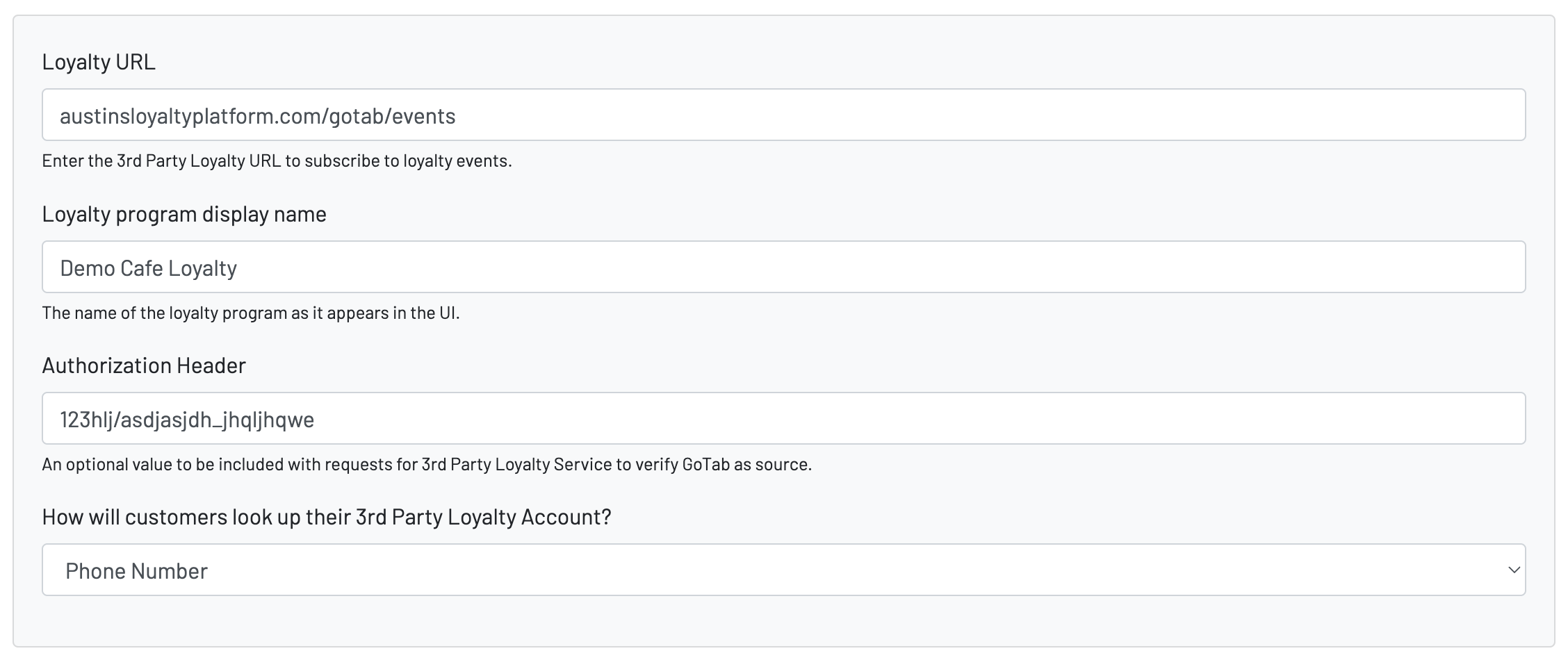
GoTab Loyalty API Dependencies:
Event Types:
INQUIRE:
The inquire event type will have a payload that includes the event\_type: INQUIRE. It will also include the lookup value the customer entered. This data may be a phone number, an email, or a customer loyalty number depending on how the lookup\_type value has been configured for your specific integration. If there are any items currently in the customers cart that are not paid for it will also include that.
Here is an example INQUIRE event type request:
{ "method": "POST", "headers": { "Content-Type": "application/json", "Authorization": "example_auth_header_123", "x-api-key": "null" }, "json": true, "body": { "tab_data": { "tab_id": "14165", "tab_uuid": "O2oFAC7fXeYNEWmmOBFZr_4S", "location_id": "1019", "name": "Austin Michael", "spots": null, "status": "PENDING", "total": 1166, "subtotal": 1100, "tax": 66, "balance_due": 1166, "created": "2025-04-01T11:00:53.247Z", "orders": [], "items": [], "adjustments": [], "payments": [], "customers": {}, "tab_metadata": null }, "event_type": "INQUIRE", "lookup_value": "+16082139090", "location_id": "1019" }}In order to indicate that a customer was found in your system please respond with a 200 status code. It is expected that even when there are no offers or points currently avaialble for a customer we will get a 200 status code with this JSON in the response:
{ "loyalty_points": [], "offers": []}In the case where the customer is eligible for offers or points here are a few examples of what your JSON responses may look like:
Offers and Points
{  "loyalty_points": [    {      "type_display_name": "Loyalty Points",      "type": "points",      "total": 100,      "available": 100,      "value": 100,      "conversion_rate": 1    }  ],  "offers": [    {      "name": "Offer Program Name",      "offers": [        {          "offer_id": "12344",          "name": "Free Drink",          "description": "This is good for any free drink",          "amount": 5,          "type": "tab_discount",          "exclusive_offer": false,          "group_exclusive_offer": false,          "auto_apply": false,          "allow_partial_use": false        }      ]    }  ]}
Just Points
{ "loyalty_points": [ { "type_display_name": "Loyalty Points", "type": "points", "total": 100, "available": 100, "value": 100, "conversion_rate": 1 } ], "offers": []}Just Offers
{ "loyalty_points": [ ], "offers": [ { "name": "Offer Program Name", "offers": [ { "offer_id": "12344", "name": "Free Drink", "description": "This is good for any free drink", "amount": 5, "type": "tab_discount", "exclusive_offer": false, "group_exclusive_offer": false, "auto_apply": false, "allow_partial_use": false } ] } ]}export const LoyaltyOffersSchema = z.object({ loyalty_points: z.array(LoyaltyPointSchema), offers: z.array(OfferGroupSchema),});
const LoyaltyPointSchema = z.object({ type_display_name: z.string(), type: z.string(), total: z.number().positive({ message: 'Point total must be greater than 0' }), available: z.number(), value: z.number().positive({ message: 'Point value must be greater than 0' }), conversion_rate: z.number().positive({ message: 'Point conversion rate must be greater than 0' }),});
const OfferGroupSchema = z.object({ name: z.string(), offers: z.array(OfferSchema),});
const OfferSchema = z.object({ offer_id: z.string(), name: z.string(), description: z.string(), amount: z.number().positive({ message: 'Offer amount must be greater than 0' }), type: z.string(), target_id: z.string().optional(), expiration_date: z.string().optional(), exclusive_offer: z.boolean(), group_exclusive_offer: z.boolean(), auto_apply: z.boolean(), allow_partial_use: z.boolean(),});In order to indicate a customer was not found in your system please respond with a status code 404 and a JSON response that looks like the following. Please note that the message is up to you. If you want to indicate that the customer should take some specific action please do so, but keep it succinct. Mainly, just be aware that any message you include will end up as an alert in our UI.
{"message": "A membership was not found for that phone number."}For any other error please response with a 400 status code and an appropriate message.
REDEEM:
The REDEEM event type is an event that will be triggered each time a customer selects an offer or set of offers to be applied to their tab. The request will include the offer\_id's that were supplied by your system in the response to the INQUIRE event. The response to the REDEEM event will indicate which selected offers are valid and should be applied as discounts to the customers tab, and which offers may no longer be valid (something may have changed betweetn the INQUIRE and REDEEM events).
One thing to note here:
- The rejected\_offers objects allow you to include a rejected\_reason property. While not required, this will serve as a way to indicate to the customer as well as an operator why an offer may not be functioning as expcted. So, please please as specific as possible here. Something like "offer has already been applied" or "offer cannot be applied after 7pm."
Here's an example REDEEM event request:
{ "method": "POST", "headers": { "Content-Type": "application/json", "Authorization": "", "x-api-key": "null" }, "json": true, "body": { "selected_offers": ["1234", "5678"], "tab_data": {}, // same structure as other events "event_type": "REDEEM", "location_id": "1019" }}GoTab expects back a 200 status code with the below data structure as a response:
{ "loyalty_points": [], "offers": { "rejected_offers": [ { "offer_id": "90909", "name": "Three bucks off", "description": "This is a three dollars off offer.", "amount": 3, "type": "tab_discount", "exclusive_offer": false, "group_exclusive_offer": false, "auto_apply": false, "allow_partial_use": false, "rejected_reason": "Offer already redeemed." } ], "valid_offers": [ { "offer_id": "12344", "name": "Free Drink", "description": "This is a free drink offer (five dollars).", "amount": 5, "type": "tab_discount", "exclusive_offer": false, "group_exclusive_offer": false, "auto_apply": false, "allow_partial_use": false }, { "offer_id": "56789", "name": "Ten bucks off", "description": "This is a ten dollars off offer.", "amount": 10, "type": "tab_discount", "exclusive_offer": false, "group_exclusive_offer": false, "auto_apply": false, "allow_partial_use": false } ] }}const offerBaseSchema = z.object({ offer_id: z.string(), name: z.string(), description: z.string(), amount: z.number(), type: z.literal("tab_discount"), exclusive_offer: z.boolean(), group_exclusive_offer: z.boolean(), auto_apply: z.boolean(), allow_partial_use: z.boolean()});
const rejectedOfferSchema = offerBaseSchema.extend({ rejected_reason: z.string()});
const validOfferSchema = offerBaseSchema;
const schema = z.object({ loyalty_points: z.array(z.any()), offers: z.object({ rejected_offers: z.array(rejectedOfferSchema), valid_offers: z.array(validOfferSchema) })});ENROLL:
The ENROLL event type lets a guest sign up for your loyalty program from the GoTab guest experience, without leaving their tab. It is a synchronous, customer-driven event: GoTab collects the guest's details in an enrollment form and posts them to the same loyalty URL used for the other event types.
Enrollment must be turned on for the integration. In the GoTab manager dashboard, enable Enable Customer Enrollment on the location's third party loyalty agent configuration. If it is not enabled, GoTab never renders the enrollment form and never sends ENROLL events.
Triggering the enrollment form
The enrollment form is offered when your platform tells GoTab, in response to an INQUIRE event, that the guest has no account yet. To request enrollment, respond to the INQUIRE event with a 404 status code and the exact message ENROLL_CUSTOMER:
{ "message": "ENROLL_CUSTOMER"}The message must match ENROLL_CUSTOMER exactly — any other 404 message is treated as a normal "customer not found" result and is surfaced to the guest as an alert (see the INQUIRE section above).
The ENROLL request
When the guest submits the enrollment form, GoTab posts an ENROLL event. Note that the guest's details are nested under a customer\_data object, unlike the other event types.
{ "method": "POST", "headers": { "Content-Type": "application/json", "Authorization": "example_auth_header_123", "x-api-key": "null" }, "json": true, "body": { "customer_data": { "enrollment_customer_first_name": "Austin", "enrollment_customer_last_name": "Michael", "enrollment_customer_email": "austin.michael@example.com", "enrollment_customer_phone_number": "+16082139090", "enrollment_customer_date_of_birth": "1990-05-14", "email_marketing_opt_in": true }, "event_type": "ENROLL", "location_id": "1019", "tab_id": "14165" }}Field notes:
enrollment\_customer\_first\_name,enrollment\_customer\_last\_name— required in the form, always present.enrollment\_customer\_email— required and validated as an email address.enrollment\_customer\_phone\_number— required, collected as an international phone number and sent in E.164 format (e.g.+16082139090).enrollment\_customer\_date\_of\_birth— required, always sent as a zero-paddedYYYY-MM-DDstring.email\_marketing\_opt\_in— always a boolean, never null or absent. See below.tab\_id— the tab the guest enrolled from. May benullwhen the guest is enrolling outside the context of a tab.
Email marketing opt-in
The enrollment form includes a marketing consent toggle, and its value is sent as the boolean email\_marketing\_opt\_in inside customer\_data. The toggle is presented alongside this consent language:
Yes, I would like to opt-in to the loyalty club and receive emails about news, announcement, promotions, offers and more! You can opt out at any time by clicking the unsubscribe link in the email footer.
Two things to be aware of when handling this field:
- The toggle defaults to on, so
trueis the common case. A guest who turns it off producesfalse, and you should not enroll them in marketing email as a result of this event. - GoTab always coerces the value to a boolean before sending, so you can rely on
email\_marketing\_opt\_inbeing present and being eithertrueorfalse. Treat it as the guest's marketing consent of record for this enrollment; GoTab does not send a follow-up event if the guest later changes their preference in your platform, and unsubscribe handling is your platform's responsibility.
Responses
Respond with a 200 status code to indicate the guest was enrolled. GoTab does not read any properties off the success response body, so an empty JSON object is acceptable:
{ "message": "success"}On success the guest sees a confirmation and is returned to the lookup screen, where they can immediately look up the account you just created. Because of this, the enrollment should be queryable by the configured lookup type as soon as you return 200.
For a failure, respond with a 4xx status code and a message. The message is displayed directly to the guest, so keep it short and actionable:
{ "message": "An account already exists for that phone number."}If the response has no message, the guest sees the generic fallback "An unrecognized error occurred, please see a staff member." The guest is returned to the enrollment form with their entries intact so they can correct and resubmit.
ACCRUAL:
The ACCRUAL event type will be an asynchronous request that will be triggered for each tab at a location as they are closed and updated in GoTab. It will basically act as an export of the tab's sales data and will include the data of the customers associated with the tab.
We intentionally send an ACCRUAL event type request for every closed tab. This may include data for customers who are not currently using your loyalty program. The idea here is that you could still store the data and in the event a customer signs up for the loyalty program after having been at the location many times prior they may get credit for those previous visits. This would depend on the limitations of your program and whether the operator configured it to behave that way.
Here's an example request for an ACCRUAL event type request
{ "method": "POST", "headers": { "Content-Type": "application/json", "Authorization": "example_auth_header_123", "x-api-key": "null" }, "json": true, "body": { "tab_data": { "tab_id": "9200", "tab_uuid": "tOp_3qizc55ojTehKtoGGKZc", "location_id": "100800", "name": "Test User", "spots": ["109104"], "status": "CLOSED", "total": 1619, "subtotal": 1295, "tax": 130, "balance_due": 0, "created": "2025-02-17T13:10:51.759Z", "orders": [ { "tax": 130, "name": "Test User", "notes": null, "total": 1619, "placed": "2025-02-17T13:10:59.358228-05:00", "status": "SCHEDULED", "spot_id": 109104, "user_id": null, "zone_id": 16866, "order_id": 72970599, "subtotal": 1295, "scheduled": "2025-02-17T13:10:59.358228-05:00", "spot_name": "Bar 101", "x_spot_id": null, "x_zone_id": null, "zone_name": "Bar", "zone_type": null, "address_id": null, "dispatched": null, "display_id": null, "order_uuid": "or_WjMDstvFo3HGAC2Ef1qZcvBd", "customer_id": 21569877, "dropoff_eta": null, "location_id": 100800, "spot_user_id": null, "spot_url_name": "bar-101", "zone_group_id": 2425, "zone_group_type": "DINING", "spot_agent_configs": null, "zone_agent_configs": null } ], "items": [ { "fee": false, "tax": 130, "notes": {}, "comped": false, "status": "OPEN", "tab_id": 9200, "x_name": "BBQ Brisket", "created": "2025-02-17T13:10:54.209875", "item_id": 16828, "options": {}, "order_id": 72970599, "prepared": null, "recalled": null, "subtotal": 1295, "tax_rate": 0.1, "discounts": false, "prep_time": 0, "x_item_id": null, "dispatched": null, "product_id": 17680342, "router_ids": [2203], "unit_price": 1295, "x_metadata": null, "x_quantity": 1, "category_id": 55060, "product_tags": ["60employee"], "product_type": "DEFAULT", "product_uuid": "prd_1L4pqUUNkJlDC8cV2d~EtweQ", "x_product_id": null, "adjust_reason": null, "category_name": "Lunch Sandwiches", "item_subtotal": 1295, "order_rule_id": null, "product_delay": null, "x_item_details": {}, "x_product_name": null, "product_options": {}, "tax_rate_detail": [ { "rate": 0.1, "tax_id": 801, "weight": 1, "tax_name": "Tax" } ], "true_unit_price": 1295, "true_x_quantity": 1, "x_price_level_id": null, "product_base_price": 1295, "x_product_base_price": null, "order_rule_discount_percentage": null } ], "adjustments": [], "payments": [ { "amount": 1619, "tip": 130, "name": "TEST USER", "autograt": 194, "created": "2025-02-17T13:10:58.447506-05:00", "customer_id": 21569877 } ], "customers": { "tabOwnerIsPOSUser": false, "tabOwnerCustomerId": "21569877", "allCustomersOnTab": [ { "tab_id": "9200", "customer_id": "21569877", "created": "2025-02-17T13:10:51.759Z", "tab_viewed": "2025-02-17T13:10:51.851Z", "handle": "+16082139087", "protocol": "s", "email": null } ] }, "tab_metadata": null }, "event_type": "ACCRUAL" }}A 200 response would look like the following (note the id which we store in our system for referential integrity and reconciliation):
{ "message": "success", "id": "hl123hlj12h31"}A 4xx response in addition to having the relevant status code should include a message that we log out on our side in order to debug:
{ "message": "Tab missing customer data."}REVERSAL:
The REVERSAL type event is an asynchronous event that will be triggered when an applied offer is voided off a tab or a tab with applied offers is fully refunded. At your discretion, this will serve as a way to make these offers available to applied again.
Here's an example request for a REVERSAL type event request:
{ "method": "POST", "headers": { "Content-Type": "application/json", "Authorization": "example_auth_header_123", "x-api-key": "null" }, "json": true, "body": { "reversed_offers": ["offer_id_1", "offer_id_2"], "event_type": "REVERSAL", "location_id": "1019" }}A 200 response to this will look like this:
{ "reversal_id": 90909}A 4xx response to this request should look like this:
{ "message": "Offer reversal failed for this reason."}Common issues
Section titled “Common issues””Unable to add tab to account” on check-in
Section titled “”Unable to add tab to account” on check-in”This error indicates the integration is missing the Agents permission on the location. To resolve: in the GoTab manager dashboard, navigate to the location’s integration settings and confirm the Agents permission is enabled for the loyalty integration. If the option is not visible, contact api.support@gotab.io.
Loyalty events not reaching your endpoint
Section titled “Loyalty events not reaching your endpoint”Check the following in order:
- Webhook endpoint registered — confirm your endpoint URL is listed in the Integration Dashboard at gotab.io/manager/integrations and that the relevant loyalty event types are subscribed.
- Integration enabled on production — a common mistake is completing setup in sandbox and forgetting to enable the integration on the production location. Verify the integration status is enabled (not just configured) on your live account.
- Endpoint is reachable — your endpoint must be publicly accessible over HTTPS. Check that there are no firewall rules or auth layers blocking GoTab’s webhook agent (
User-Agent: GoTab-WebhookAgent).