
How do I set a spend limit on a pass?
Cap how much a GoTab pass can spend on a tab, with a hard block or a soft cutoff after the limit is crossed. Applies to RFID and phone passes.
You can set a spend limit on a GoTab pass — a physical RFID card/wristband or a phone pass — so a guest’s spending on that pass is capped for the life of the tab.
Digital passes aren’t supported in this release. Spend limits can only be set on physical RFID passes and phone passes today. Digital pass support may be added in a future release.
Is this right for my location?
Section titled “Is this right for my location?”Pass spend limits are useful if you regularly issue RFID wristbands, cards, or phone passes and want to cap what a guest can spend on one — for private events with a host-set budget, family or parental spending controls, or corporate allowances. If your location doesn’t use tab passes, this article doesn’t apply to you. If your location relies primarily on digital passes, this feature isn’t available to you yet.
This feature is live but turned on per location. If you don’t see the settings below, contact your GoTab account representative to have it enabled.
Setting up a spend limit
Section titled “Setting up a spend limit”Turn on the prompt (optional)
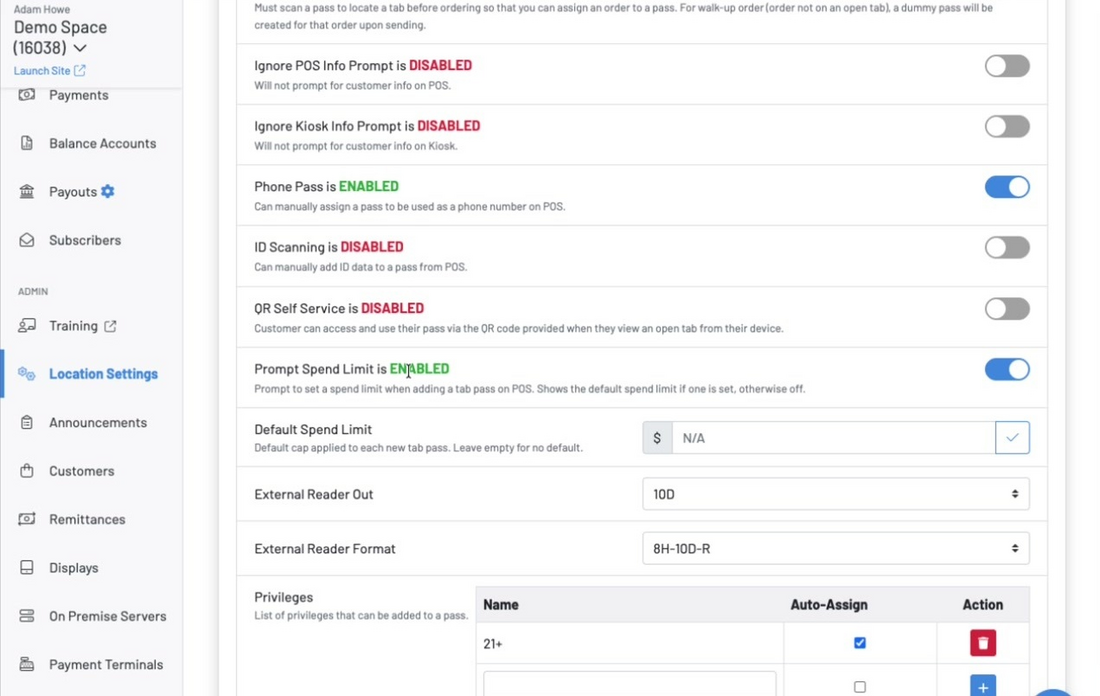
Section titled “Turn on the prompt (optional)”Go to Location Settings, select Edit, then Display Settings, and scroll to the bottom of the Pass Settings section. Turn on Prompt Spend Limit if you want staff asked to set a limit every time a pass is added to a tab. If you leave this off, you can still set a limit manually on an individual pass after it’s issued. You can also set a Default Spend Limit here so it applies automatically to any new pass, whether or not the prompt is on.
Choose a default enforcement mode
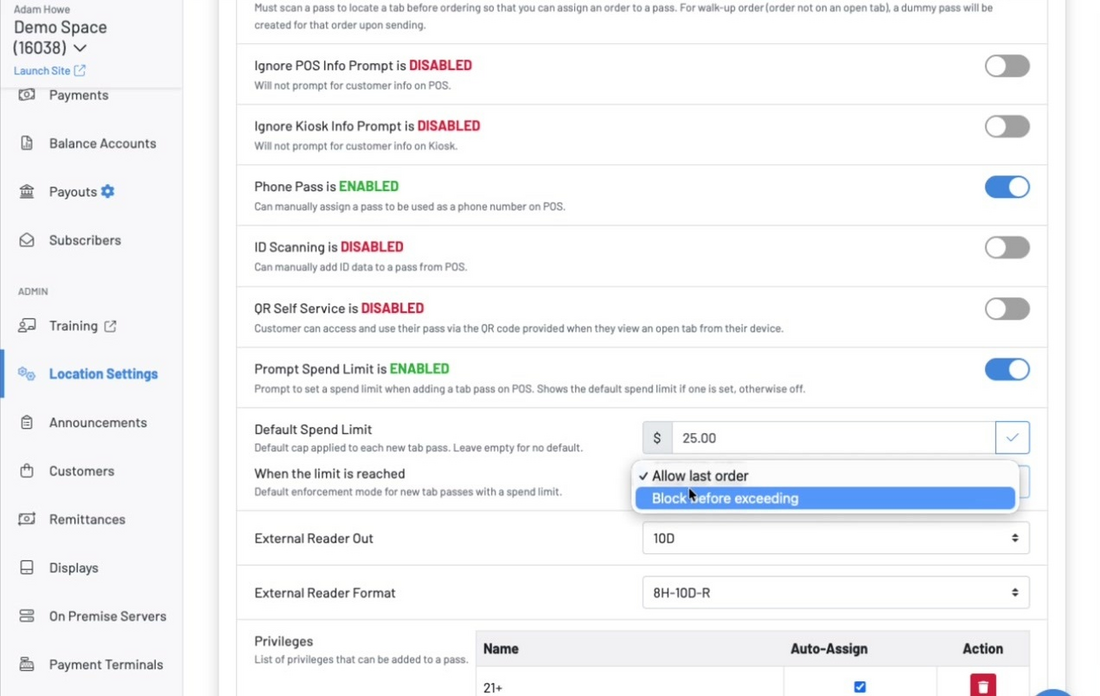
Section titled “Choose a default enforcement mode”Once a default spend limit is set, choose what happens when the limit is reached — this becomes the default for new passes and can still be changed per pass.
| Mode | Behavior |
|---|---|
| Allow last order | The order that crosses the limit is allowed, but no further orders can be placed on that pass. |
| Block before exceeding | Any order that would cross the limit is blocked outright. |
Add the pass to a tab
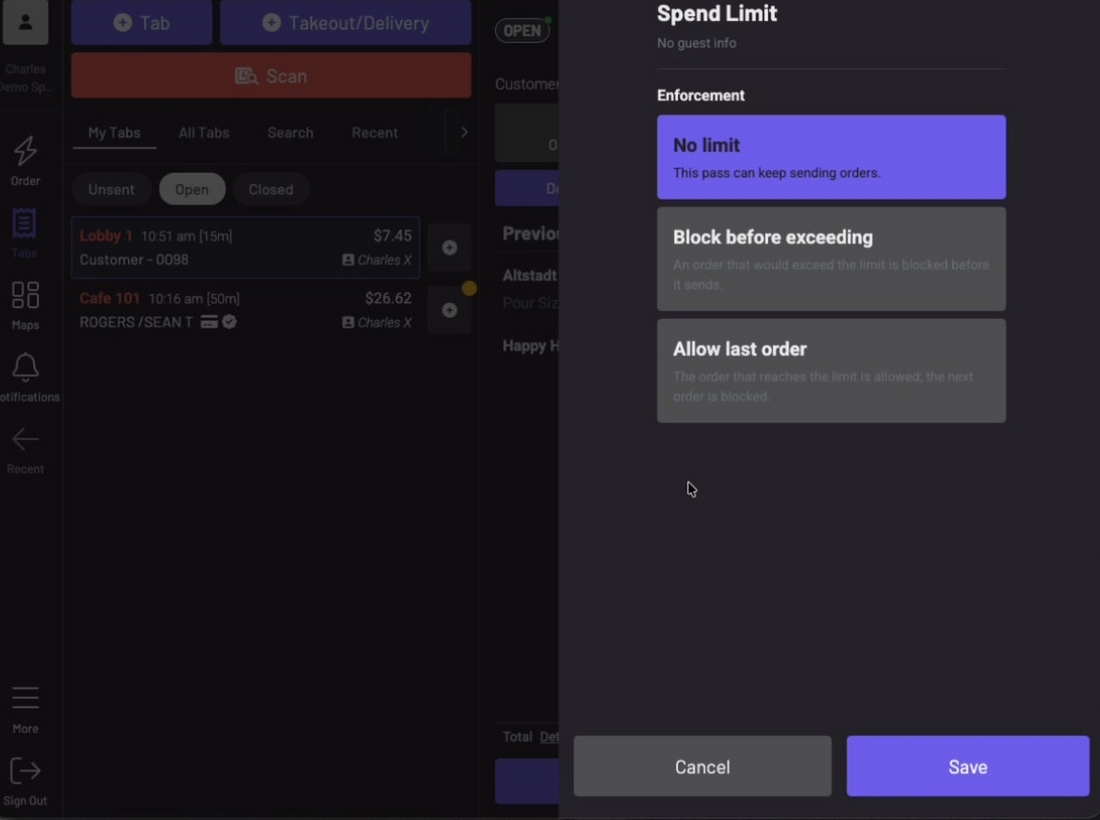
Section titled “Add the pass to a tab”Add the pass to a tab as usual. If Prompt Spend Limit is turned on, you’ll be asked to set an amount and choose an enforcement mode — No limit, Block before exceeding, or Allow last order — at this point.
Watch the running total
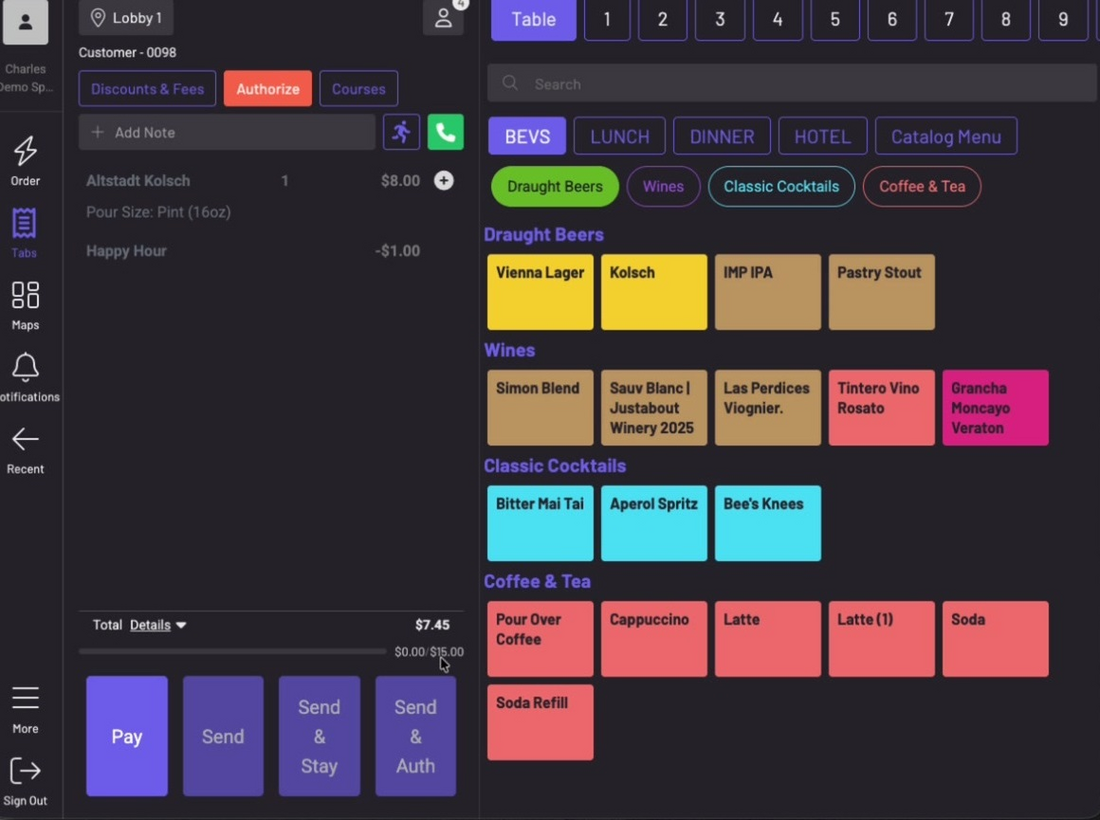
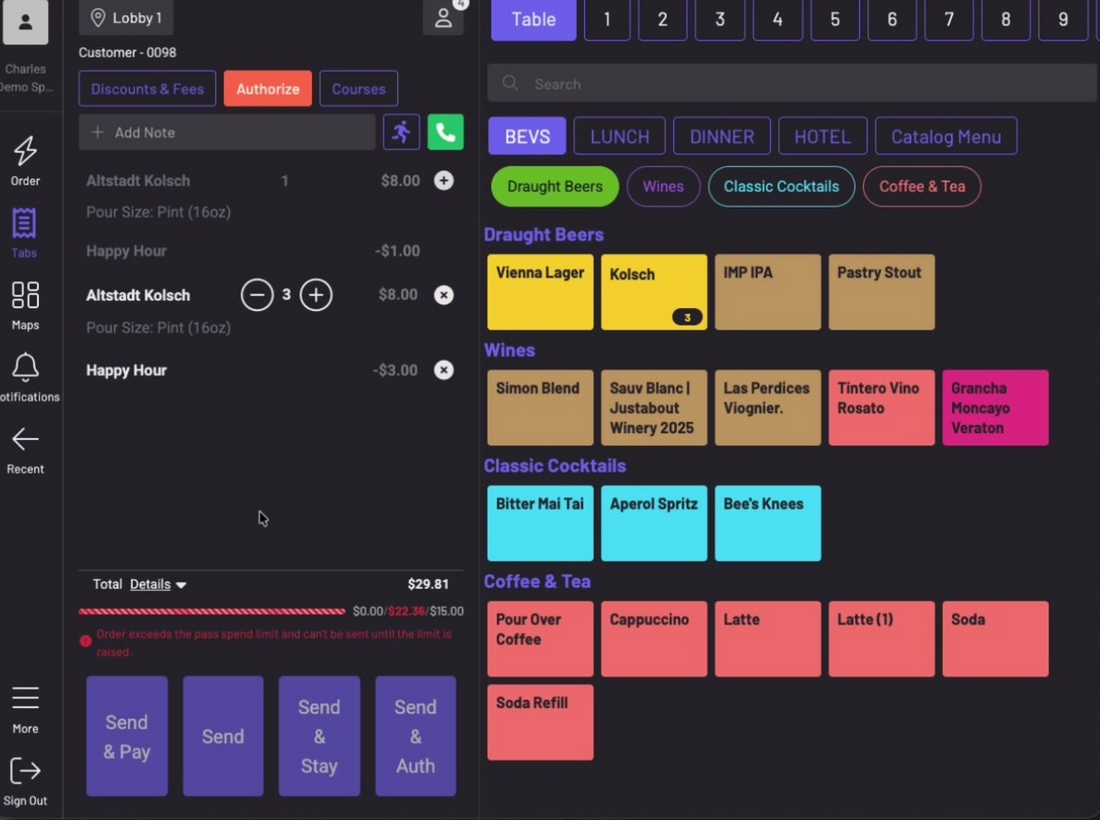
Section titled “Watch the running total”The tab shows a progress bar tracking how much has been spent against the limit in real time, including tax and any cart rules applied to the order.
What a blocked order looks like
Section titled “What a blocked order looks like”If the pass has a hard limit (Block before exceeding) and an order would cross it, the progress bar turns red and the order can’t be sent until the limit is raised or items are removed.
When to use this
Section titled “When to use this”- A private event or group buyout where the host has set a per-person budget
- Family or parental spending controls on a wristband or card
- A corporate outing or team event with a fixed per-employee allowance
Keep in mind
Section titled “Keep in mind”- A $0 limit can’t be set directly. To remove a limit from a pass, clear the field entirely rather than entering 0.
- The bulk pass-adding flow (Tab Pass Optimization) does not currently prompt for a spend limit, even when adding a single pass through that flow. If you use that flow for events, set limits on passes individually after they’re added, or use the default spend limit setting as a temporary workaround.
- Digital passes aren’t supported in this release. Spend limits can only be set on physical RFID passes and phone passes. Support for digital passes may be added in a future release.
- Self-pour wall and similar partner-hardware integrations do not enforce the limit until that partner has built to GoTab’s Tab Pass Spend Limits API. This includes, but is not limited to, iPourIt, Pour My Bev, Napa Tech, Pourtek, WineEmotion, Amusement Connect, and Draft Serv. Check with your GoTab account manager on current partner status before relying on wall-level enforcement.
- Orders placed without a pass attached are not checked against any pass limit.
- This is a different feature from the existing tab-level spend limit, which only sends a text notification to the server and does not block orders. See How do I set a spend limit on a tab? if that’s the feature you’re looking for.
Can I set different limits for different passes on the same tab?
Yes. Each pass carries its own independent limit and limit type.
Does the limit account for discounts and cart rules?
Yes, the running total reflects the order after tax and any applicable cart rules, such as a BOGO discount, not the pre-discount price.
What happens when a hard limit is reached?
The order can’t be sent. Staff see the limit-reached message on the POS, and the send button is disabled for that order.
What happens when a soft limit is reached?
The order that crosses the limit goes through, but no further orders can be placed on that pass until the limit is raised or cleared.
Can I use this on a phone pass?
Yes. Spend limits can be applied to phone-based passes and are enforced the same way as RFID passes.
Can I use this on a digital pass?
Not in this release. Spend limits currently apply only to physical RFID passes and phone passes. Digital pass support may be added in a future release.