
How to redeem a GoTab digital gift card
Guests can redeem an unclaimed digital gift card by QR code or card number, and claiming it remains optional for added security.
Starting August 31, 2026, a guest no longer has to claim a digital gift card before using it. This article covers how the redemption page works, what changes for guests and operators, and what to expect from gift cards purchased before the update.
What changed
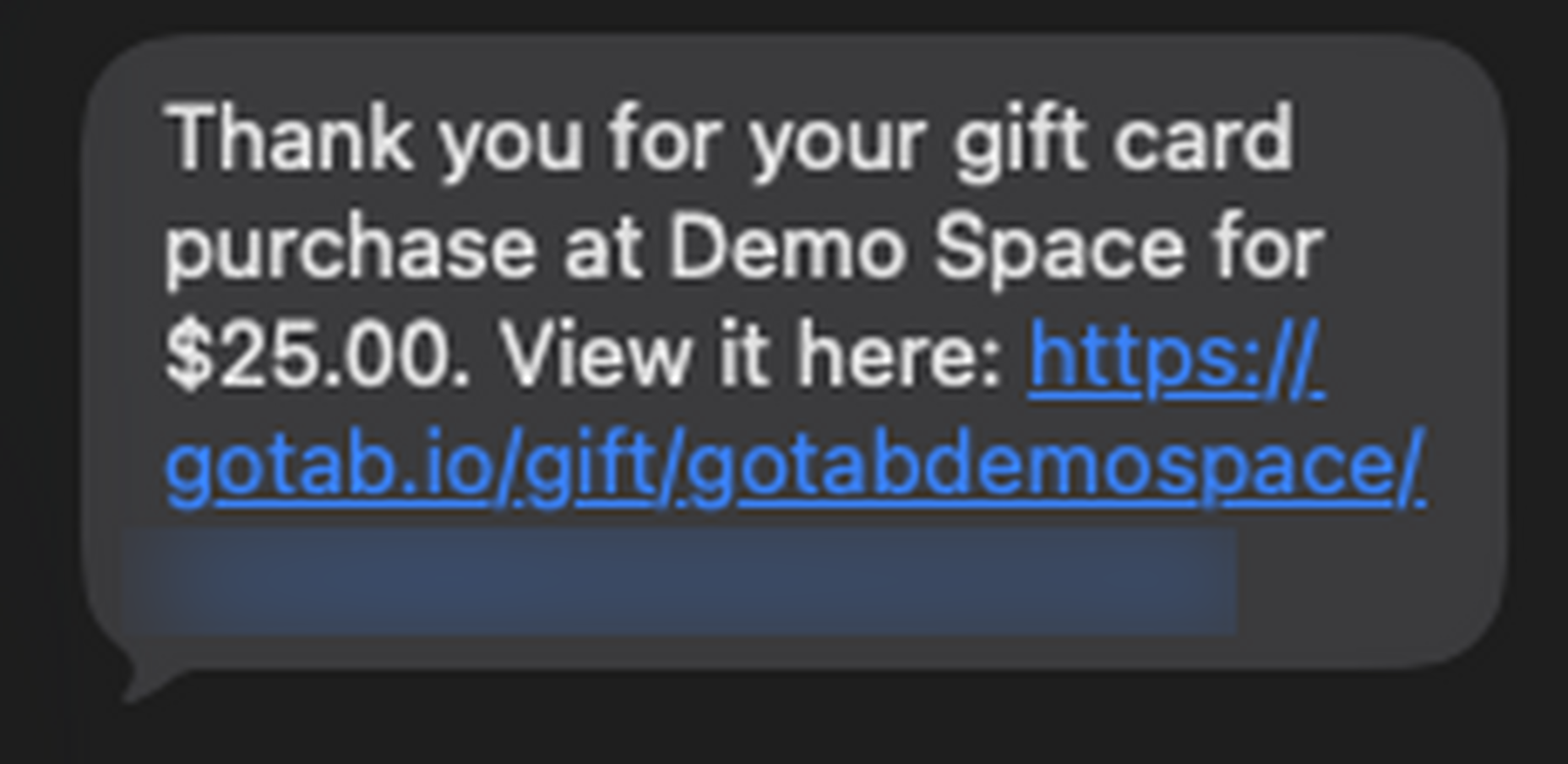
Section titled “What changed”Before August 31, 2026, a guest had to tap Claim Gift Card and add the card to a GoTab account before they could use it. Now, the email or text message a guest receives links to a redemption page instead. Anyone with that link can view and use the gift card as long as it has not been claimed.
What the guest receives
Section titled “What the guest receives”The email or text message contains:
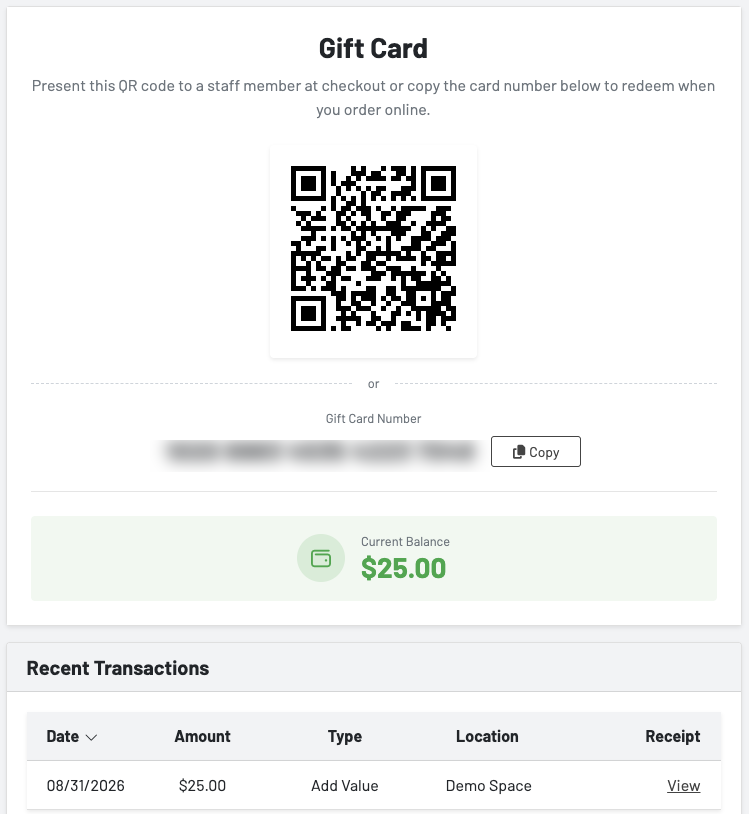
- A QR code that scans directly at the POS or in QR ordering checkout
- The gift card number, which the guest can enter manually at the POS or during online checkout
- An option to claim the card, which adds it to the guest’s GoTab account
Claiming is optional, not required, in order to use the card.
Here’s an example of the text message a guest receives:
And the redemption page the link opens to:
Claiming a gift card
Section titled “Claiming a gift card”A guest can still choose to claim a gift card. Claiming adds it to their GoTab account and locks it to that account — once claimed, the original redemption link no longer works for anyone else, including the original purchaser.
Encourage guests who want added protection (for example, if they’re concerned about someone else accessing their email or a printed copy of the gift card) to claim their card as soon as they receive it.
If a guest clicks a redemption link for a gift card that has already been claimed, they’ll see a message that the card has already been claimed rather than a generic error.
Paying with an unclaimed gift card
Section titled “Paying with an unclaimed gift card”A guest can apply an unclaimed gift card toward an order in QR ordering checkout, even if they don’t yet have a GoTab account. GoTab still requires phone verification to apply any gift card as payment, whether or not the guest is starting from scratch.
To apply a gift card manually at checkout, the guest taps “Redeem a gift card” below the order total, then enters the card number or taps the QR icon to scan it instead. The guest can also check “Save this gift card to my account” at this point to claim it while they’re at it.
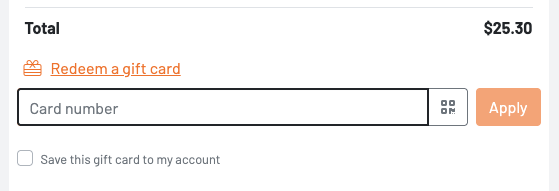
If the gift card covers the full balance of the order, the guest is not required to add a payment method. If it doesn’t cover the full balance, the guest is prompted to add another gift card or a card on file.
A guest sharing a tab can also apply an unclaimed gift card to their portion of a shared tab, and multiple unclaimed gift cards can be combined (split pay) as long as the total covers the balance due.
Gift cards purchased before August 31, 2026
Section titled “Gift cards purchased before August 31, 2026”Any digital gift card purchased before the update that has not yet been claimed will redirect to the new redemption page instead of the claim page, as long as it’s still unclaimed. The guest doesn’t need to do anything differently — the existing link in their email or text continues to work, it just leads to the redemption page.
A gift card that was already claimed before August 31, 2026 works exactly as it always has: it lives in the guest’s GoTab account and can be applied at checkout.
Kiosk ordering
Section titled “Kiosk ordering”Gift cards can’t currently be used to pay at a kiosk. This isn’t changing as part of this update.
Scheduled digital gift cards
Section titled “Scheduled digital gift cards”Scheduled digital gift cards aren’t affected by this change beyond the message itself. The gift card is still sent at the scheduled date and time — it just arrives with the new redemption-page link instead of the old claim link.
Frequently asked questions
Section titled “Frequently asked questions”Does a guest still need a GoTab account to use a gift card? No, not to use an unclaimed gift card. A GoTab account (name and phone number) is still required to place any order through QR ordering, but a payment method is not required if the gift card covers the full balance.
What happens if someone else gets a guest’s gift card email or text? As long as the card is unclaimed, anyone with the link, the QR code, or the card number can use it. Guests who want to prevent this should claim their card as soon as they receive it.
Can an operator require claiming for every gift card at their location? Not at this time. There is no location-level setting to require claiming. If a location asks for this, have them raise it with their Account Manager — it may be evaluated for a future release.
Will an operator be notified if a claimed gift card’s redemption link is used? No. The guest sees a message that the card has already been claimed instead of a generic error, but the operator isn’t separately notified.
Keep in mind
Section titled “Keep in mind”- Claiming a gift card remains available and is the more secure option for guests who want to guarantee only they can use it.
- Once claimed, a gift card is locked to that GoTab account and the original redemption link stops working for everyone else.
- If a gift card’s option group allows more than one selection (a minimum/maximum other than 1), a guest can accidentally select multiple amounts and generate a single card for the combined total instead of separate cards. Set gift card option groups to a minimum and maximum of 1 to prevent this. See How to set up gift cards.
- Kiosk ordering doesn’t support gift cards.