How to Access a User Report
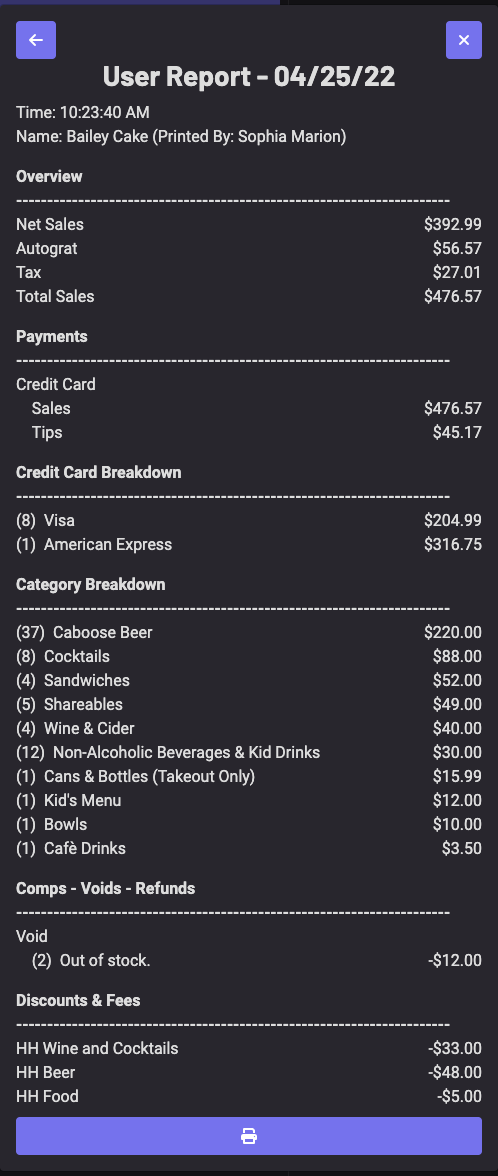
On the POS, the user report allows operators to monitor sales, taxes, and tips for individual employees or all users.
On the POS, the user report allows operators to monitor sales, taxes, and tips for individual employees or all users!
Section titled “On the POS, the user report allows operators to monitor sales, taxes, and tips for individual employees or all users!”The User Report Includes
- Net Sales, Auto-gratuity, Tax, and Total Sales
- Tender Types
- Case due to house/server
- Product Breakdowns
- Comps, Voids, and Refunds
- Discounts and Fees
To Display the User Report
- On the POS, click the ≡ icon [in the left-hand corner]
- Select Report
- Generate the report by selecting the User and Date
- To print the user report, simply click the printer icon at the bottom